
What is Smadav Pro 2026?
If you’re looking for a lightweight antivirus that can work alongside your existing Windows security software, Download Smadav Pro 2026 is worth knowing about. Smadav is designed differently from a traditional primary antivirus. Instead of asking you to replace your current security solution, it focuses on providing additional protection for Windows PCs, internet activity, and USB flash drives. The official Smadav website currently lists Smadav 2026 Rev. 15.8.2 as the latest release, with an updated detection database containing 35,800 new viruses and a fix for repeated update notifications.
The idea behind Smadav is fairly simple: think of your computer’s security as a house with several doors. Your primary antivirus protects the main entrance, while Smadav can act as another layer around specific areas that are frequently targeted, particularly removable USB storage. This approach makes the software especially interesting for people who regularly exchange files using flash drives, external storage, or downloaded applications. Smadav’s developer also describes it as a second-layer antivirus, recommending that users keep another more comprehensive antivirus, such as Windows Security/Defender, active alongside it.
Smadav Pro 2026 Overview
Smadav Pro 2026 is a powerful antivirus utility designed to provide an additional layer of security for your PC and USB storage devices. Built to complement your primary antivirus software, such as Windows Defender, it helps detect and remove malware, clean infected files, and prevent unauthorised applications from running in the background. Despite its protective capabilities, the software is lightweight and optimised to maintain system performance, making it particularly suitable for older computers and environments where USB drives are frequently used.
Smadav Pro 2026 includes a range of useful features that enhance both security and usability. It supports automatic online updates to keep virus definitions current and introduces the Smad-Turbo scanning mode, which accelerates scans by prioritising potentially infected files. The Exception List feature allows trusted files and folders to be excluded from scans, while the customisable interface lets users resize the application window and change the default green theme to their preferred colour. For shared environments such as offices, schools, or internet cafés, an Admin Password feature helps prevent unauthorised access to settings. Overall, Smadav Pro 2026 is a dependable secondary antivirus solution that combines fast scanning, USB protection, and flexible customisation in a lightweight package. You can also downlaod Glary Malware Hunter Pro Portable
Features of Smadav Pro 2026
- Powerful antivirus application designed to provide an extra layer of protection for your PC and USB storage devices.
- Works seamlessly alongside your primary antivirus software, including Windows Defender.
- Detects and removes viruses, cleans infected files, and blocks unauthorised applications from running in the background.
- Delivers reliable security while maintaining excellent system performance without slowing down your computer.
- Lightweight solution, making it ideal for older PCs and environments where USB drives are frequently used.
- Supports automatic online updates to keep virus definitions and security features up to date.
- Includes the Smad-Turbo scanning engine, which speeds up scans by prioritising potentially infected files.
- Features an Exception List that lets you exclude trusted files and folders from scanning.
- Offers a customisable interface, allowing you to resize the application window and change the default green theme to your preferred colour.
- Includes Admin Password protection to prevent unauthorised access to settings in shared environments such as offices, schools, and internet cafés.
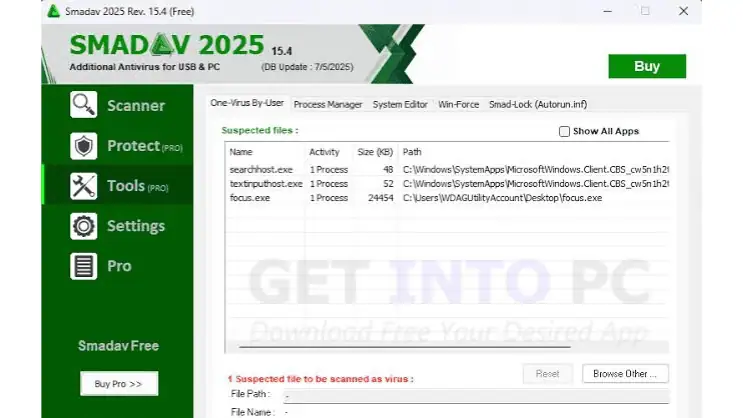
Smadav Pro 2026Setup Details
| Software Name | Smadav Pro 2025 Free Download |
| Setup File Name | Smadav_Pro_2025_v15.5.rar |
| Full Setup Size | 5.6 MB |
| Setup Type | Offline Installer / Full Standalone Setup: |
| Compatibility Architecture | 32 Bit (x86) / 64 Bit (x64) |
| Release Added On | 21th June2026 |
| Developers | Smadav Pro |
System Requirements
| Component | Component |
| Operating System | Windows XP/Vista/7/8/8.1/10 |
| Processor | 1 GHz processor or better |
| RAM | 1 GB or more |
| Storage | At least 50 MB free space |
| Internet | Internet connection recommended for updates |
| USB | USB port recommended for flash-drive protection |
How to Download Smadav 2026
The official Smadav download page currently identifies Rev. 15.8.2 as the latest release and says the download should start automatically, with a mirror available if the primary download doesn’t work.
For the safest installation, follow these five steps:
- Visit the official Smadav website and open its Download page.
- Download the latest Smadav 2026 installer, currently listed as Rev. 15.8.2.
- Wait for the installer to finish downloading, then check that the file came from the official source.
- Run the installer and follow the on-screen instructions to complete setup.
- Open Smadav and update it if required, then perform an initial scan of your computer and removable drives.